Book Review: Advanced Android Application Development…

(So, disclaimer first: I’ve been working with the publisher & authors of this book through every edition as a technical reviewer; I don’t get anything from the sale of the books, but I enjoy working with the publisher and the authors.)

So, I got my review copy of Advanced Android Application Development, fourth edition by Joseph Annuzi, Jr, Lauren Darcey, and Shane Conder last week, and all I can say is that this great book gets better with every edition.

There are a lot of Android books out there, and most of them churn through the same basic stuff about views, intents, and services, with a smattering of information about networking and databases thrown in for good measure. This is the book you turn to for what’s next: serious discussion about SQLite databases services, notifications, input methods, networking, telephony, and Google Services like maps, location, cloud messaging, in-app billing, and analytics. There’s even a whole section — multiple chapters — on graphics, both 2D and 3D graphics programming using Android’s support for graphics and OpenGL ES. Recently updated to its fourth edition, there’s even some coverage of Android Lollipop and Android Wear. And there’s plenty of review material about networking and web access, too.

The book has copious sample code; the text fortunately doesn’t just reprint listings and leave you to puzzle over what they do, but carefully chooses the pertinent bits and pieces of sample applications illustrating the proper way to use Android interfaces. The full sample code of the applications is available for download, just as you’d expect. In many cases the samples are good enough to adapt for your own work, although they occasionally elide much of the necessary error handling that a good mobile application would require.

It’s hard to find fault with this book: with excellent coverage of SQLite, Android’s notification system, input methods & accessibility, and internationalization. Written right when Android L and Android Gear were being unveiled, it’s a little short on details on those topics, but that’s to be expected — it’s still got more than many books on the market today.

If you’re doing Android development, I strongly recommend getting a copy of this book and at least leafing through the parts of it that are new to you; it’s my go-to reference for all things advanced in Android.

Another year, another book!

I’m pleased to announce that the second edition of my book Application Development with Qt Creator is now available from Packt!

This updates the first edition significantly, covering the latest and greatest changes in Qt Creator from Qt 5.x. In addition, I cover many of the fundamentals of software development using the Qt framework itself, including:

  • Drawing in Qt using both the widget and scene frameworks
  • Qt Quick
  • Multimedia programming
  • Sensors & location
  • Using Qt to develop software for mobile platforms like Android

If you’re interested in the best in cross-platform development frameworks for desktop and mobile platforms, Qt is where it’s at. With this book, hopefully I can help you speed your development effort along a little!

Providing images to Qt Quick with QQuickImageProvider…

I have been meaning to post this for a while, although no one’s asked me specifically about it.

A couple of years ago, while at Nokia, I wrote this post on QML and image providers for Qt 4.x.

While revising my latest book on Qt this fall, I learned that in Qt 5.x, the QDeclarativeImageProvider class is now the QQuickImageProvider class. The interface remains the same, so the guidance still stands — just replace one with the other.

If you want more details, stay tuned — my book should be out in the next couple of weeks, and I’ll post a link.

And another book is out!

I’m excited to announce that my new book, Application Development with Qt Creator, is now available for sale at Packt and available for pre-order at Amazon!

I love Qt — it is one of the best frameworks I’ve ever worked with for any kind of development in C++. I was excited when Packt approached me to write a mini-guide on getting started with Qt Creator, Qt’s cross-platform IDE. As written, the book covers everything you need to know to get started using Qt Creator, from installing the IDE to compiling, editing, debugging, optimization, and localization. There’s also a chapter on using Qt for mobile development on Android.

This book is aimed at developers new to Qt and IDEs in general. If you’re just getting started programming, maybe studying on your own or taking a college course, you’ll want a copy.

A new book is out!

I am excited to say that as I write this, the new book I’ve written with Carmen Au is available. In Microsoft Mapping: Geospatial Development with Bing Maps and C#, Carmen and I give you a soup-to-nuts introduction to everything you need to know about applying Microsoft technologies for mapping and geospatial applications. We talk about the Bing Maps API, of course, in all its forms, but we also give you a whirlwind tour of Azure, including SQL Azure’s geospatial extensions, and Microsoft Power Map as well. I’ve worked with Carmen for almost three years now, and this collaboration with her is the one I’m most excited about.
I hope you’ll check it out!

First hike of spring!

I got out today for the first time since this winter for a real hike — not just a quick walk with the dog, but something that takes more than half an hour and is worth bringing the camera.

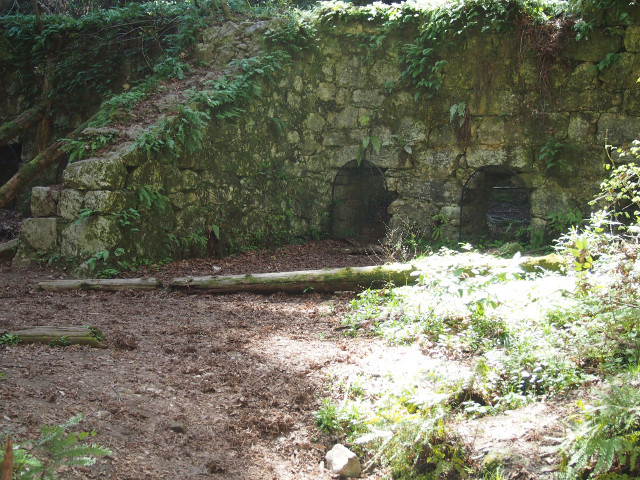
I went out to Fall Creek, down in Felton; there’s some nice history along the trail there. In the late 1800’s and early 1900’s, this valley’s economy was driven by lumber and lime — much of early San Francisco was constructed with resources drawn from here. Anyway, up the Fall Creek trail are the remnants of old lime kilns and a limestone quarry run by I.X.L. Lime Company.

Fall Creek

I started out to the lime kilns first; it’s about two kilometers from the parking lot up the South Fork of Fall Creek. The park was packed — I was hiking between a family taking visitors out and a bunch of families with small children.

Once at the lime kilns, I waited until the people had moved on and got some photos. The kilns are huge; they’d pile wood in the bottom and then the limestone over it, and it would apparently burn for days. It must have made an amazing amount of heat. Above the kilns you can see bits of the rail car system used to bring the limestone down to the kilns, although you have to look hard to find it.

Lime Kilns

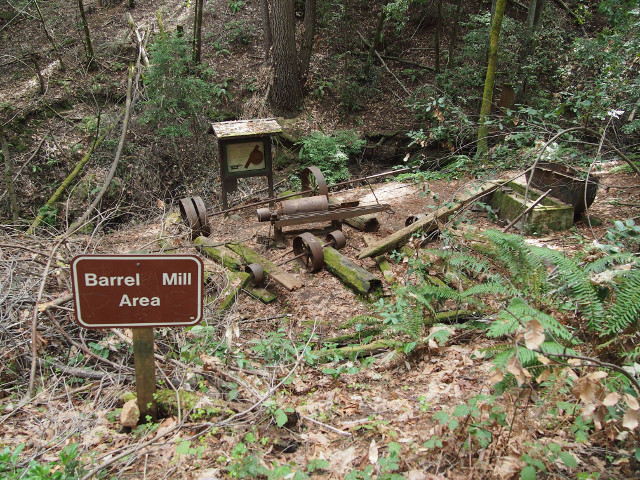
Then I continued past the powder store and up the canyon to the barrel site, where the barrels for the lime were made. This is another couple kilometers from the site; I would assume — although I don’t know — that the primary reason for putting the cooperage where it was was because of the water power needed to run the sawmill, and the trees to cut for the wood for the barrels. There’s still a fair amount of old equipment, too.

Barrell Mills

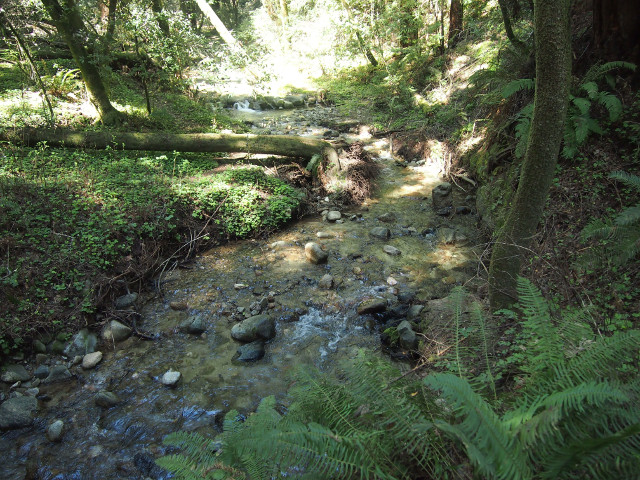
Once there, I walked back along the North Fork of Fall Creek. Hiking along the creek is an interesting experience; the photos don’t really do it justice, but you’re usually sandwiched between canyon walls separated by tens of meters, with the trail sharing the bottom of the canyon with the creek. The creek’s eroded the base of the canyon and the trail quite a bit; there’s lots of places where you cross the creek, or have to trek up the canyon wall a few meters and back down because a shift in the creek has eroded the logical place for the trail.

I took quite a few photos, although none of them really capture the size of the trees or creek canyons. You can see them in my photo album.

Overall, a good day to be out!

Wait. Where have you been?

Well, gee, it’s been eight months without a post. If you were hoping for wisdom about Yesod, I’m really sorry that I let you down.

Shortly after starting the project, I learned that my day job at Nokia Research Center was going away — specifically, Nokia was closing the lab that I worked at, and I would be looking for another job.

Thanks to several supportive people — among them, my boss at Nokia and his boss — I landed fairly quickly on my feet with others I’d worked with before, at Microsoft, working in the division that’s responsible for a lot of cool things for Bing. It’s been a great transition, but it’s been like drinking from a firehose — I lived a very sheltered life, well away from a lot of mainstream Microsoft technologies (SQL Server, ASP.NET, and ASP.MVC, I’m looking at you!) and in addition to my regular work responsibilities in my new role, most of my learning cycles have been coming up to speed on the latest enhancements to C#, the various public and private frameworks I use in my new job, and so forth. Under the circumstances, something had to give, and Yesod was that something.

I’m sorry.

I’ve thought a few times about making this another Microsoft technology blog, but there are an awful lot of them, and I’m starting behind where many, many good bloggers are. About half of the epiphanies I’ve had about programming for the twenty-first century Microsoft platform would be old hat to most of you, and the rest probably don’t care — you’re probably still using Qt on Ubuntu or something like that.

At the same time, there’s been no work towards the next book, which was always the purpose of this blog — to cross-pollinate between what I did at work, what I wrote for you in print, forging a connection between the two. That’s not to say there aren’t more books coming at some point; in fact, I’m incubating a couple of ideas now. But they’re in the incubation stage, and publishers generally like freshly baked content, not content that’s been posted for free on the Internet first. (Can you blame them? I can’t.)

But stay tuned. More is coming; I’m just not quite sure what or when yet.

“Hello World”, Yesod style…

Here we go! Without further ado, borrowed in part from Developing Web Applications with Haskell and Yesod
(although the discussion that follows is mine, taken from what I now understand about the code).


{-# LANGUAGE TypeFamilies, QuasiQuotes, MultiParamTypeClasses,
TemplateHaskell, OverloadedStrings #-}

import Yesod

data HelloWorld = HelloWorld

mkYesod "HelloWorld" [parseRoutes|
/ HomeR GET
|]

instance Yesod HelloWorld

getHomeR :: Handler RepHtml
getHomeR = defaultLayout [whamlet|Hello World!|]

main :: IO ()
main = warpDebug 3000 HelloWorld

This makes use of several extensions not part of the Haskell standard:

  • Type families
  • Quasiquoting, used for lots of little domain specific languages (DSLs) like the one used to specify the binding between the front controller and handler methods
  • Templated Haskell — a lot of Yesod code generates other code that actually supports your Web application

We’re going to create one data type that’s the foundation of our Web application. In a bigger Web app, this data type would have all the stuff needed for initialization, too — stuff like bringing up a persistent database connection. Our foundation is HelloWorld.

The next bit of code uses the parseRoutes DSL to set up the binding between the Web application’s URIs and the functions that the framework invokes when requests for those URIs come in — the “resource”, as denoted by the trailing R in the function’s name. The syntax is path to resource, then whitespace, then the resource, then more whitespace, then the HTTP method used to access the resource.

We indicate that HelloWorld is an instance of Yesod, the type class encapsulating the behavior of Yesod’s framework.

Next, we declare the resource handling function for /. The framework expects the resource handler to be named as a concatenation of the HTTP method used to access the resource and the resource itself — hence getHomeR is the resource for handling GET requests of the HomeR resource, which we bound to the path /. It’s of type Handler RepHTML, indicating that it returns HTML. Ours uses the whamlet quasiquoter to take an HTML-based DSL and return actual well-formed HTML to the client. As I’ll get into in a later post, you can evaluate Haskell and do other nifty stuff in the context of the various DSLs for content here — it’s pretty cool. Yesod refers to these bits of HTML as widgets, and they can be put in different files so you can have a web page built up of small, reusable widget components, each written in a DSL for HTML called Hamlet.

Our handler just returns Hello World!.

Next up, we have our main function, invoked when the application starts. main uses a built-in web server, Warp, running in this case on port 3000, wired to the HelloWorld class.

We can run all of this using runhaskell helloworld.hs on our local development box, and we’re rewarded with a running Web application on port 3000 — to hit it, start the application in a terminal window, and then go to http://localhost:3000 in a browser window. You can see what HTML the framework produced by choosing “View source”, too.

Apparently, you don’t have to deploy with Warp, although some people do. You can also tether this to a CGI, or even deploy it in a stand-alone WebKit application! This last idea really interests me — you could build a pretty complicated application using Yesod and WebKit, and package it up as a stand-alone binary, I guess. You’d be limited, of course, to what WebKit could present, but with what JavaScript and HTML5 can do together, that’s an interesting way to slap a nice UI on a larger Haskell project, especially if it’s backed by a SQLite database for data storage. I’m going to have to think some more about that.

Next up, expect either some musings on that score, or perhaps a more in-depth look at Hamlet, the HTML templating language! In the mean time, I encourage you to play around with the resource DSL set up by parseRoutes — try adding content to your “application”.

Before we begin with Haskell & Yesod: the environment

So, a word about the environment I’m going to use. I’m going to do my general hacking in Haskell on Ubuntu 12.04, running on either my MacBook Air or a Nokia Booklet 3G, depending on what’s closer. I’ll be using the haskell-platform installed from the stable debian repository. As I want to push things into a “production” instance, I’m going to be hosting things on Amazon’s EC2 — if I get serious about this project and want to share data, I’ll scale out on EC2.

Getting Started: Ubuntu on the MacBook Air
Installing Ubuntu Desktop i386 12.04 on my MacBook Air was a bit of a trial, and I didn’t document all the steps thoroughly. The general approach was to follow the steps at the Ubuntu site here, although one thing I did that gave me problems was to create a separate partition on the drive for the installation media, because doing that meant that I couldn’t repartition the disk when I did the install. Eventually, I was able to make a bootable USB stick, boot the USB stick using rEFit, format the new partitions, and I was set. Dual-booting between Ubuntu and Mac OS X using both the built in ssytem and rEFit works great.

Getting Started: Ubuntu on the Nokia Booklet 3G
I have a special place in my heart for the Nokia Booklet 3G, because the darned thing is indestructible, and sports a 3G modem for anywhere-wireless connectivity. Unfortunately, it feels about as slow as the VAX 11/70 I shared with sixty university students the week before finals, so it doesn’t get as much love from me as it otherwise might. But I prefer its keyboard over that on the MacBook Air, actually, and the pretty blue cover just looks sweet.

Earlier releases of Ubuntu on the Booklet were pesky to set up because of the stupid integrated graphics driver, but that’s been well-documented for some time. Here’s what I did to get things running:

  1. Use UNetBoot to create a bootable USB stick with Ubuntu Desktop i386 12.04.
  2. When booting from the stick, switch to the console using ctrl-alt-f1, log in, and
    sudo lightdm restart to get past the black screen.
  3. Run the installer as normal.
  4. When the system reboots, switch to the console using ctrl-alt-f1, log in, and
    sudo lightdm restart to get past the black screen.
  5. Fix the video issue permanently on boot by editing the grub configuration: change GRUB_CMDLINE_LINUX_DEFAULT in /etc/default/grub to "quiet console=tty1 acpi_backlight=vendor acpi_osi=Linux mem=896mb" and update grub using sudo update-grub.
  6. Fix a problem with the trackpad during standby by editing /etc/pm/config.d/gma500 and adding the line ADD_PARAMETERS='-quirk-vbemode-restore'.

Getting Started: Getting Haskell and Yesod on Ubuntu
Once you’ve got Ubuntu all set up and updated with the latest packages, open a shell and run:

sudo apt-get update
sudo apt-get install emacs23
sudo apt-get install haskell-platform
sudo apt-get install haskell-mode

Now, add $HOME/.cabal/bin to your path in your .bashrc or the shell configuration of choice, and reload the shell configuration file.

cabal update
cabal install yesod-platform

to install yesod.

Getting Started: Getting Haskell and Yesod on EC2
I couldn’t get a base AMI instance running with a later version of the haskell platform — I chose an instance that was too small and cabal failed to build. Picking a bigger instance, I couldn’t get the Haskell platform to build with the version of ghc that I chose. I then moved to using a RedHat instance backed by ebs, and as root:


yum update
yum install gmp-devel
rpm -Uvh http://download.fedoraproject.org/pub/epel/6/i386/epel-release-6-7.noarch.rpm
yum install haskell-platform

To get Yesod running, as your development user:

cabal update
cabal install yesod-platform

Next up: setting up my first site!